
Coolshed Labs
Plugin Documentation
Installation guides, feature references and technical details for each plugin.
BandStand MP3 Player Pro
A WordPress audio player for musicians and independent artists. Embeds a full-featured streaming player via a single shortcode — with EQ visualisation, synced lyrics, social sharing, fan likes, support-prompt downloads, reactive visuals and cast support.
Version
1.6.15
Requires
WordPress 5.0+
PHP
7.4+
Licence
GPL-2.0+
Guided setup
BandStand setup: start to finish
See the complete WordPress workflow before installing. Nothing advances until you choose to continue.
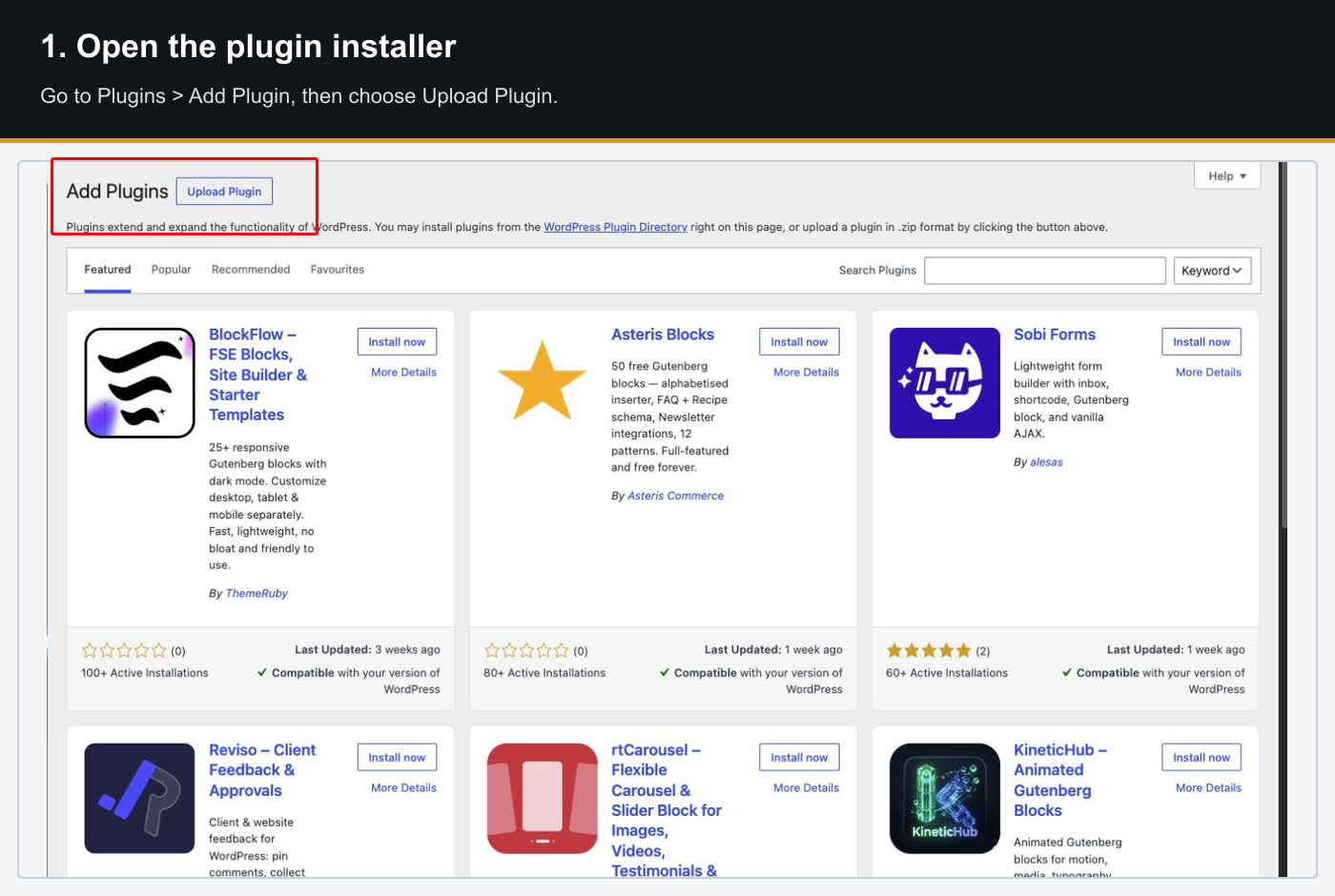
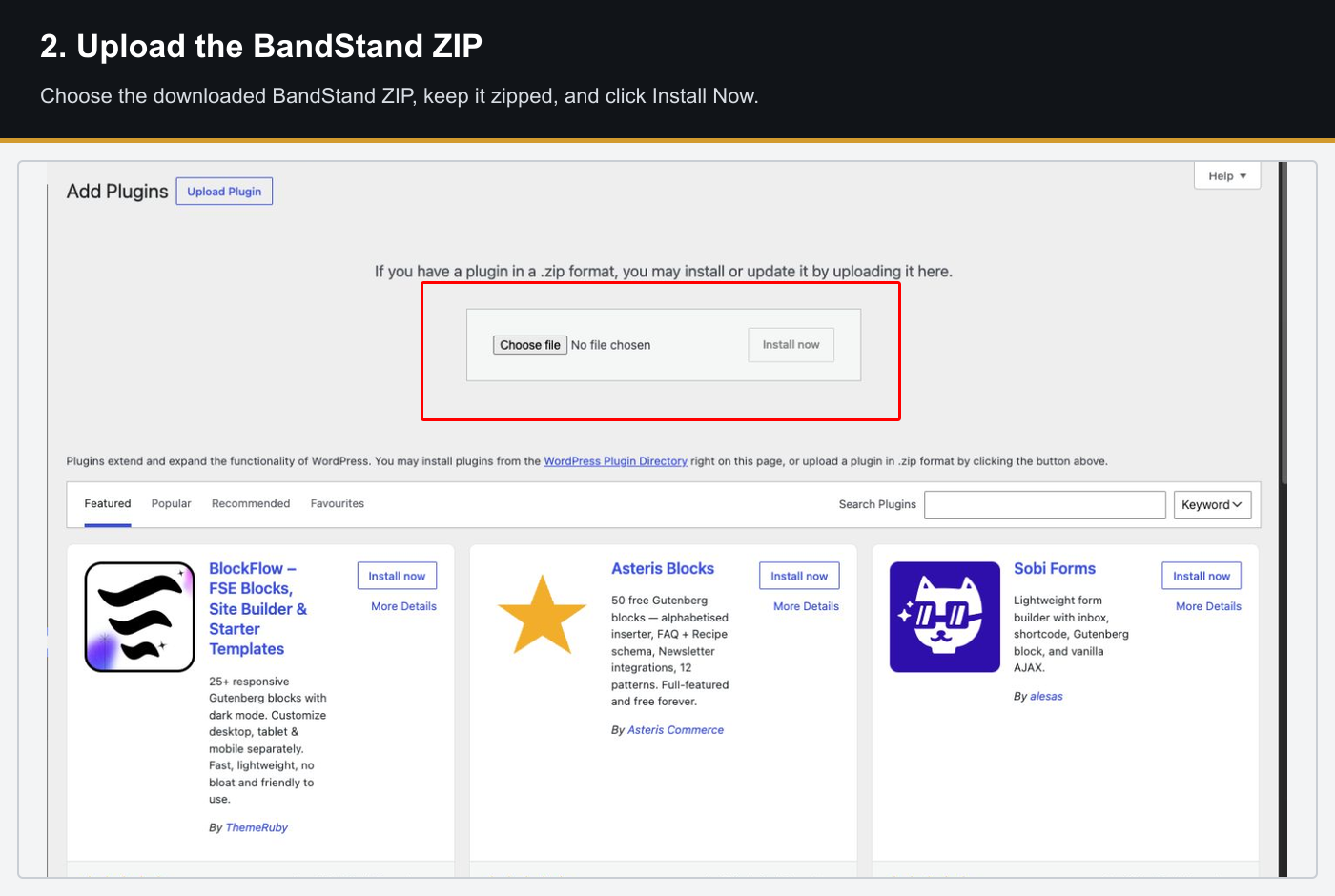
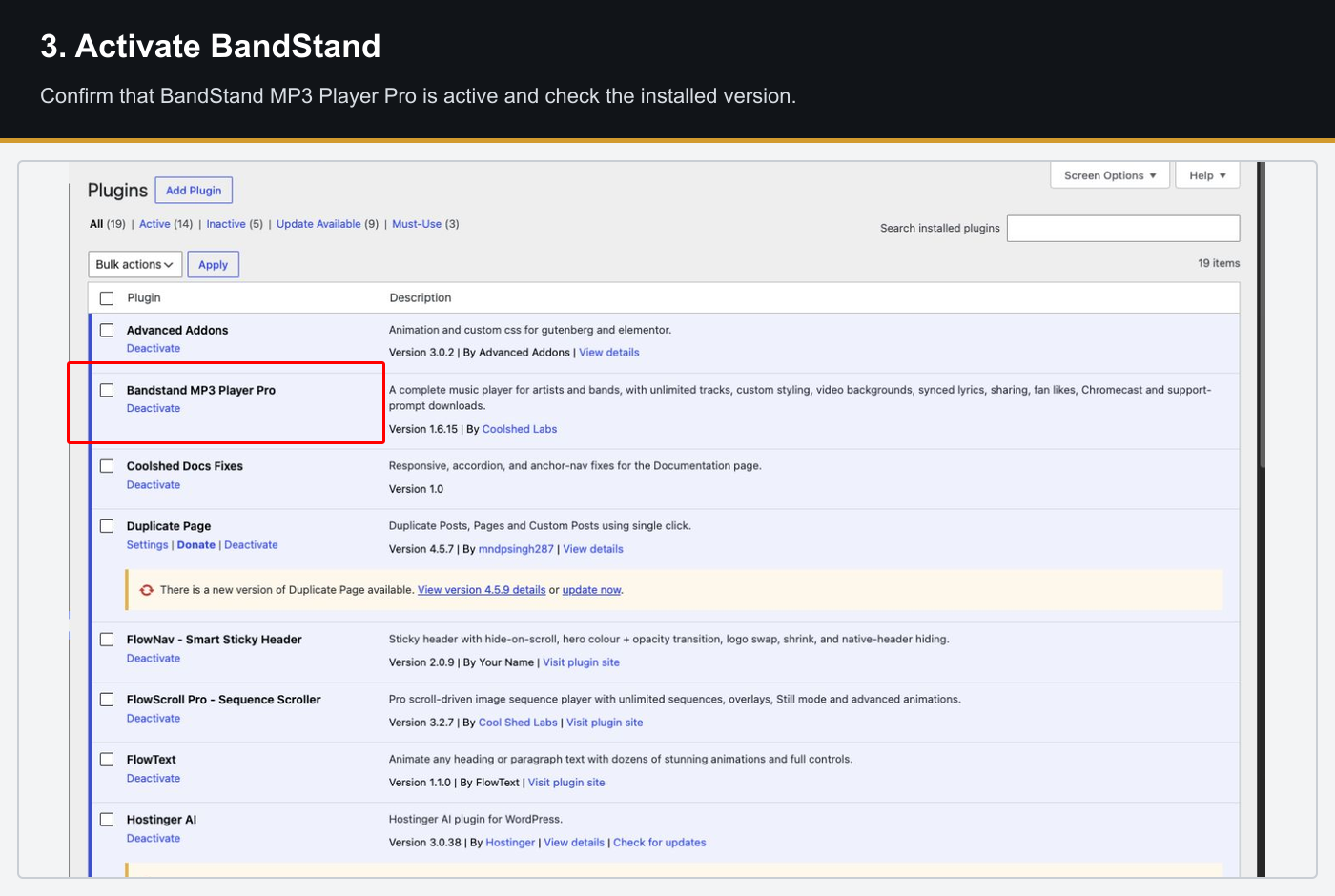
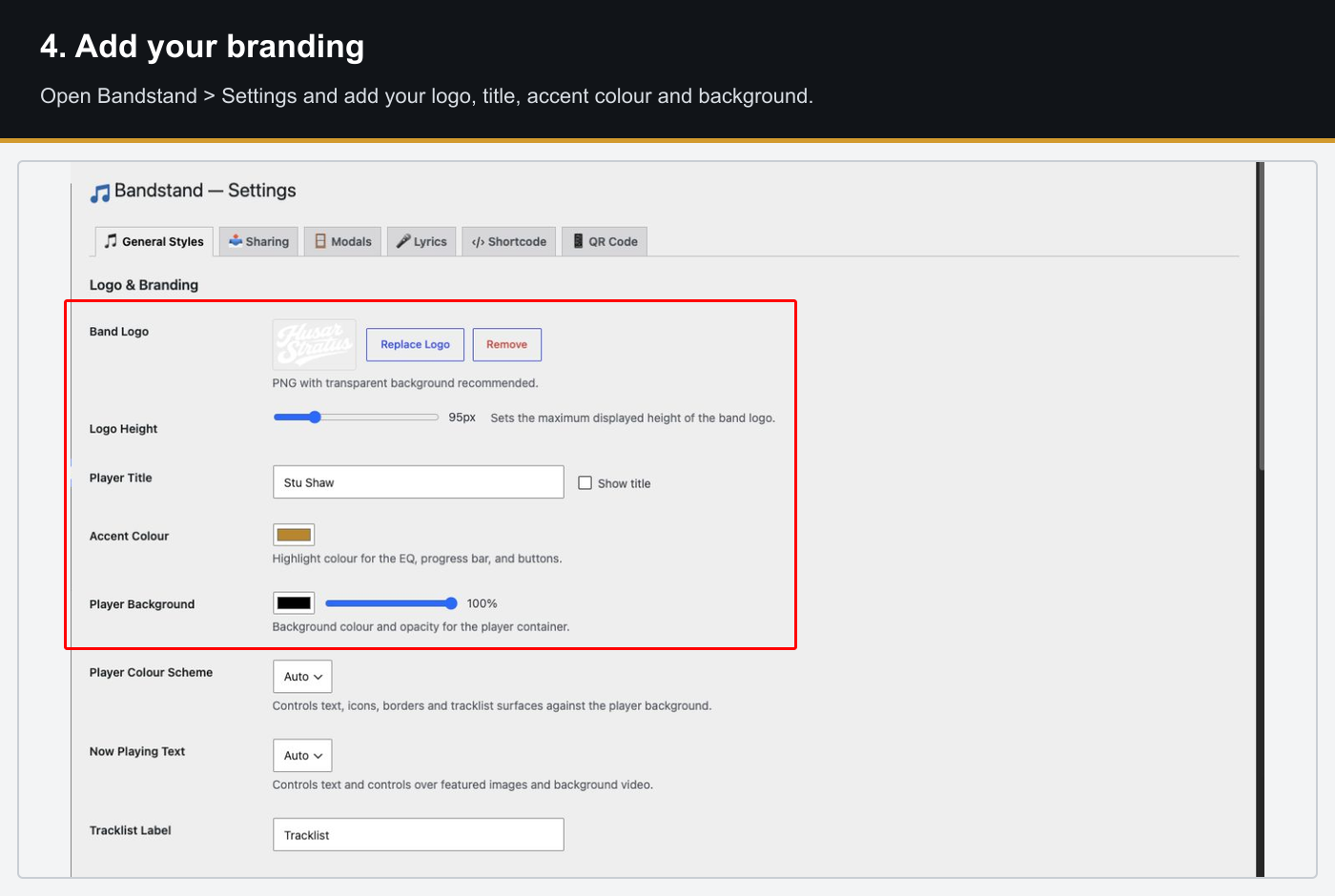
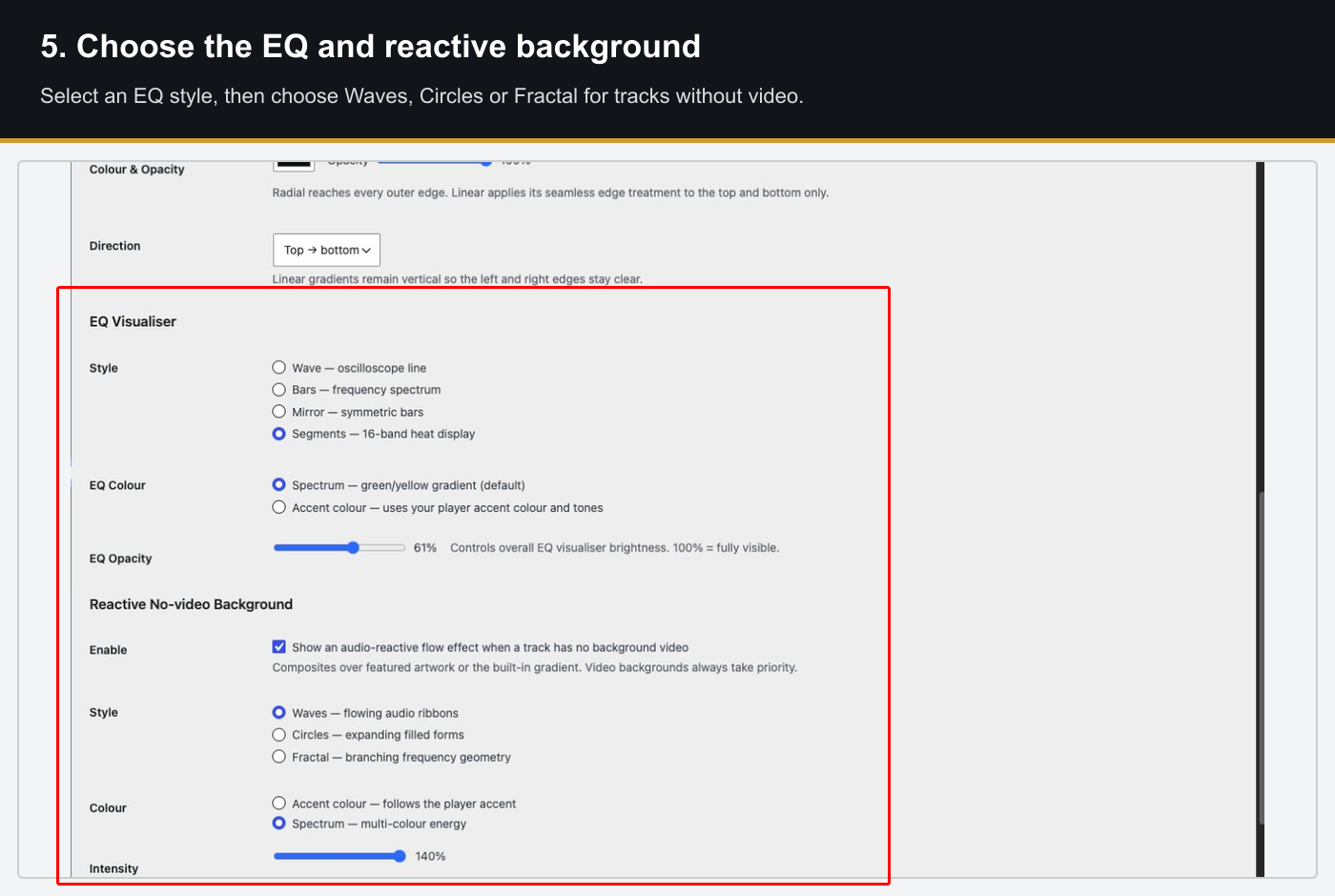
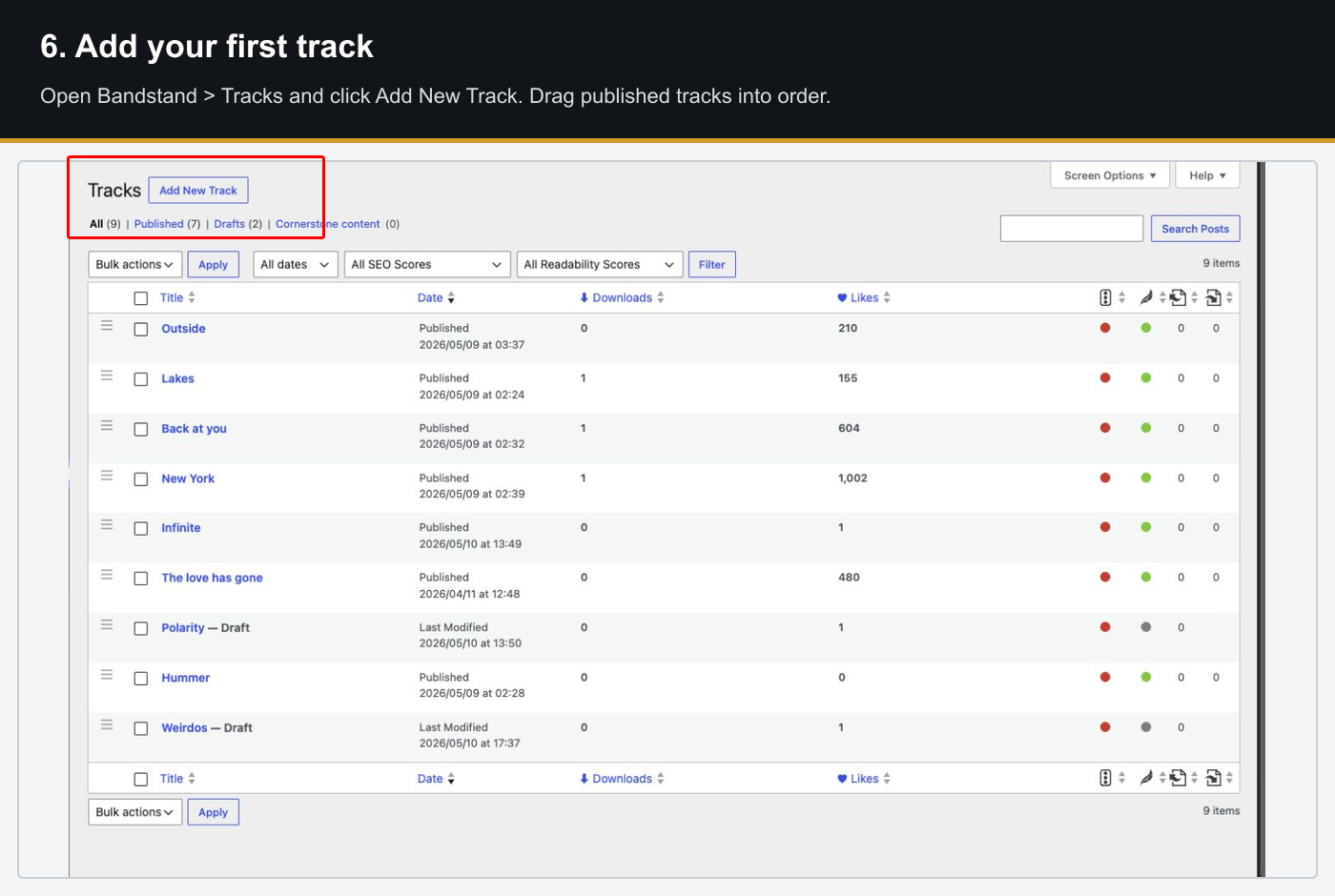
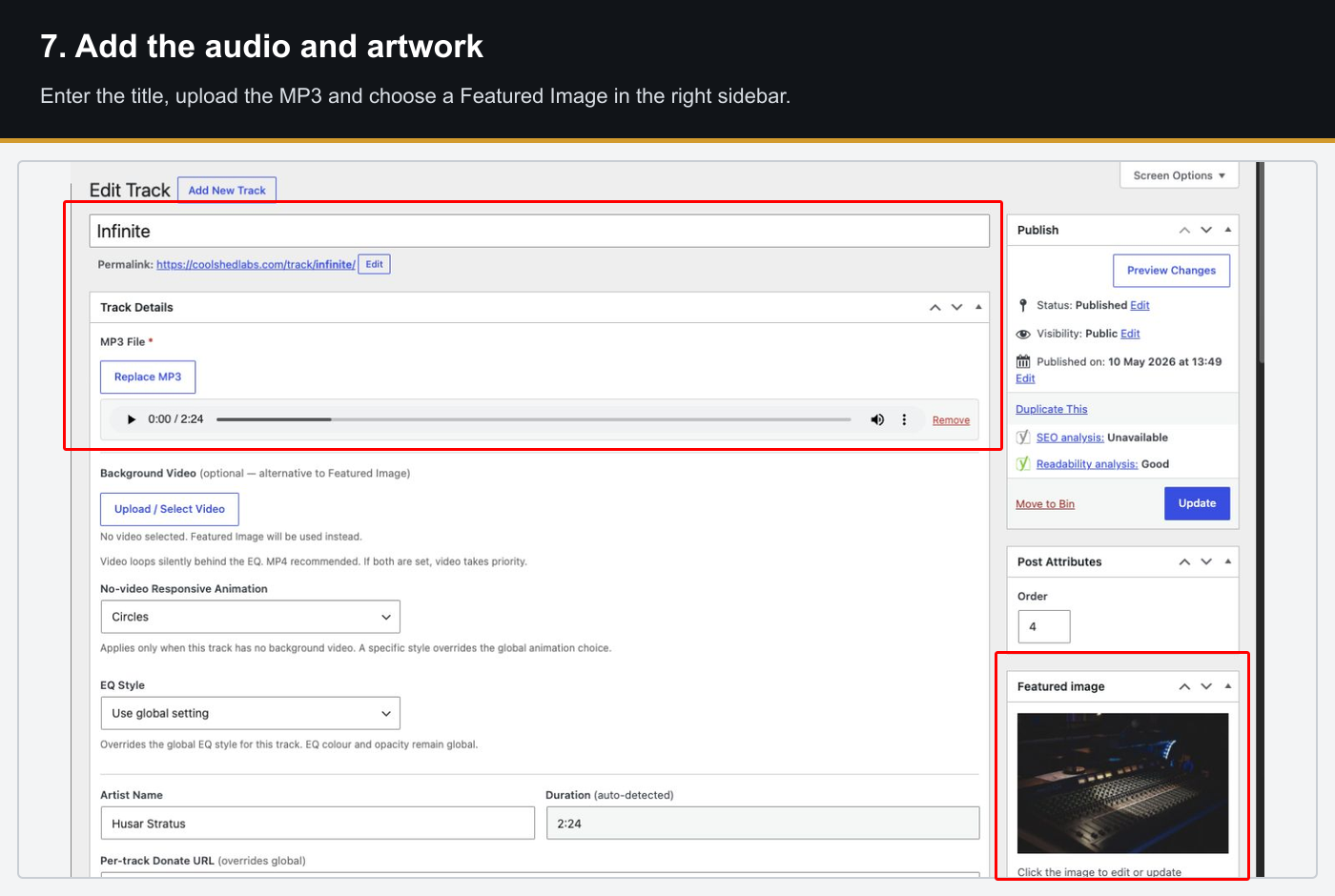
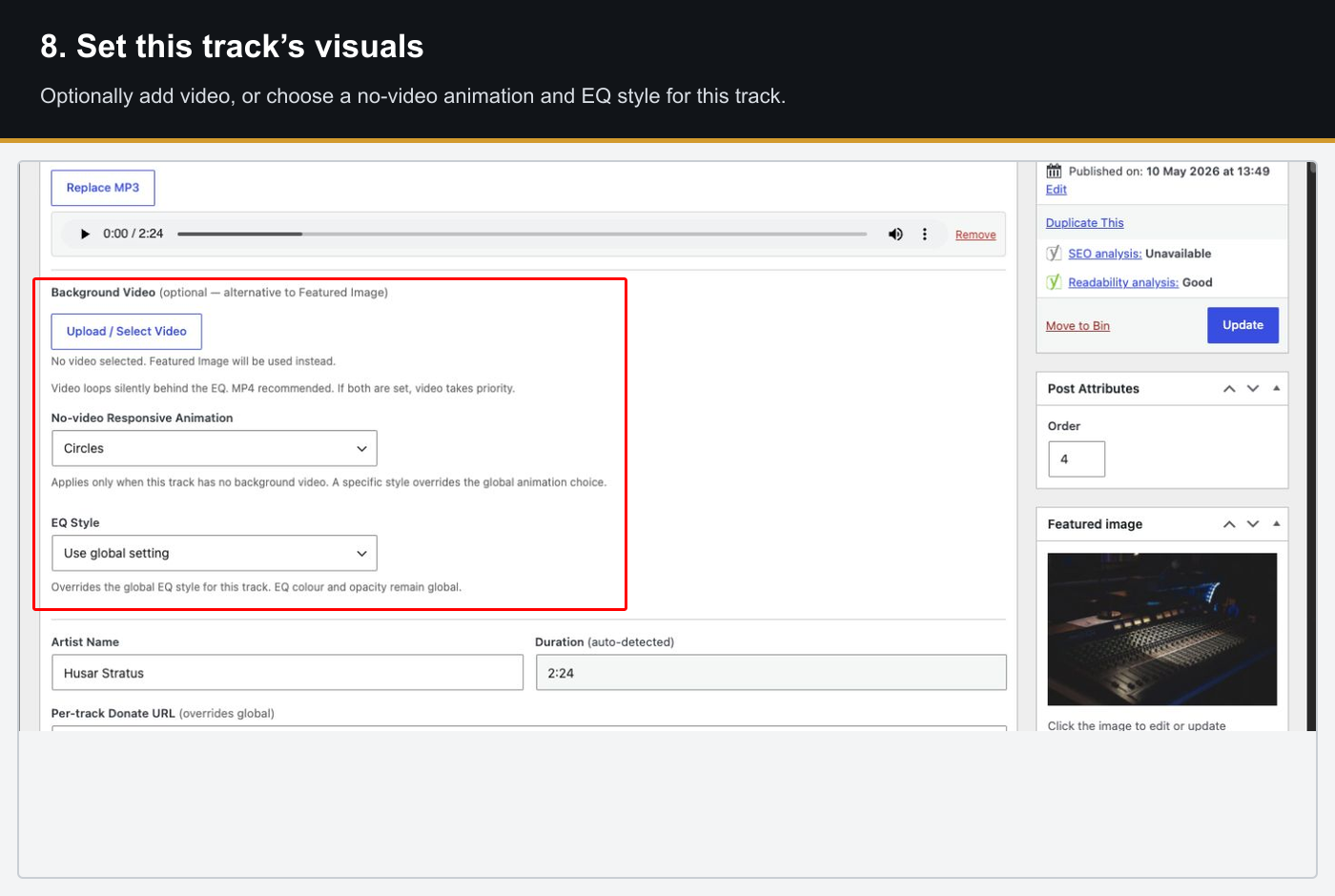
Step 1 of 12 · Open the plugin installer
Per-Track Fields

MP3 file
Uploaded via the WordPress media library. Used for streaming playback.

Artwork
Square image shown as the now-playing card background, blurred and cover-fit.

Background video
Looping video that plays behind the EQ, replacing the artwork when set.

Artist / Genre / Year / BPM
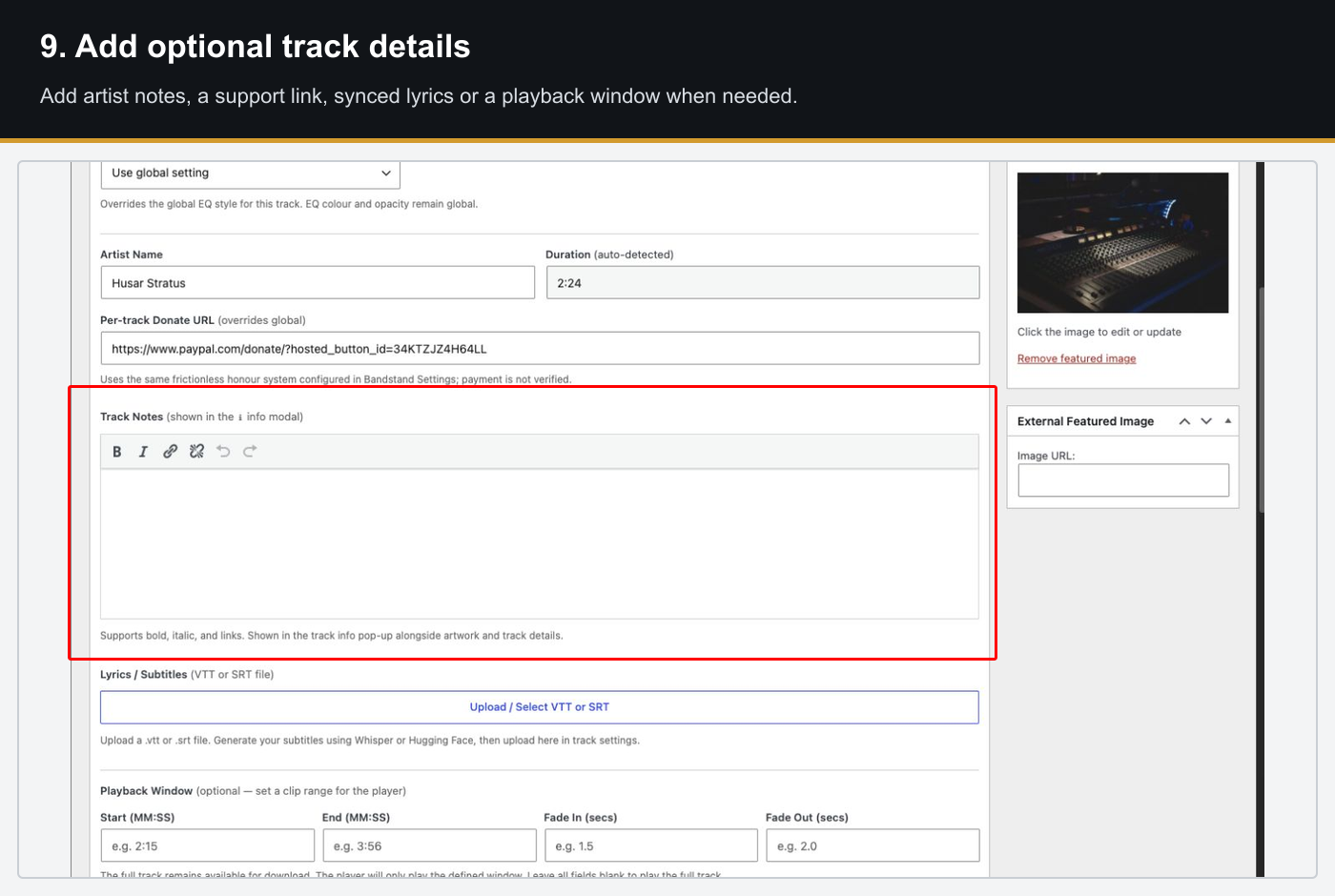
Displayed in the Track Info modal alongside freeform HTML notes.

Lyrics file
Attach a vtt or srt file for real-time synced lyric display.

Download file
Separate file served on download — can differ from the streaming MP3.
Take a look under the hood…
Have a good look at the BandStand PRO admin area, change settings,
add tracks and experience the intuitive UI.
Features
- Continuous audio playback via HTML5
<audio> - Play, pause, previous, next controls
- Shuffle and repeat modes
- Scrubber / seek bar with elapsed and total time display
- Mini player — fixed to the viewport bottom; playback continues while scrolling
- Automatic track advance at end of queue
- Deep-link track selection via
?bs_track=<id>URL parameter - Cast button — cast to Google Cast (Chromecast) or Apple AirPlay directly from the player controls
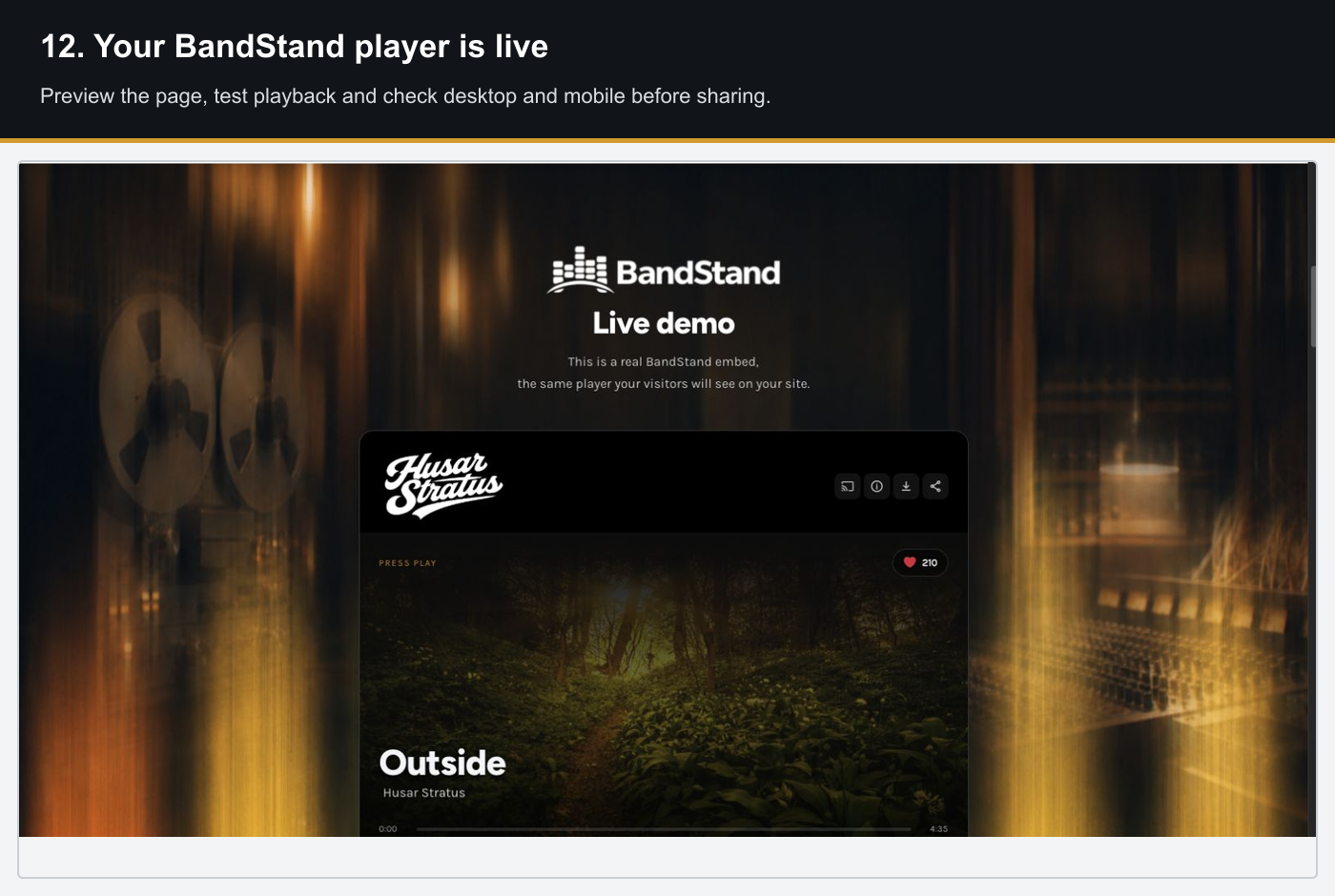
- Full-width hero card — edge-to-edge within the player container
- Artwork image as card background (blurred, cover-fit)
- Background video — looping video that plays behind the EQ (replaces artwork when set)
- Smooth crossfade between tracks
- Animated gradient overlay with user-configurable colour, opacity, type and angle
- “Now Playing” status indicator with animated pulse dot
- Large track title with display font; artist name below
- Google Cast (Chromecast) — the Cast button appears automatically in browsers that support the Cast API (Chrome on desktop and Android); listeners can send audio to any Chromecast or Google-enabled speaker on the same network
- Apple AirPlay — on Safari for iOS and macOS the native AirPlay picker appears, allowing listeners to route audio to AirPlay-compatible speakers, Apple TV, or HomePod
- Both controls use the browser’s native casting APIs — no additional app or plugin is required on the listener’s device
- The cast button is displayed in the player controls area and only rendered when the listener’s browser reports cast capability
- Drag-to-reorder in the admin — order reflects live on the player
- Track number, title, artist, duration, like button and action icons per row
- Accent-colour left bar and highlight on the currently playing track
- EQ animation icon on the active row
- Track icons always visible: 65% opacity on inactive rows, 100% on the current track
- Share button per track with a modal containing a pre-filled link and message
- One-click copy of the shareable URL
- Social share buttons: X/Twitter, Facebook, WhatsApp, Email
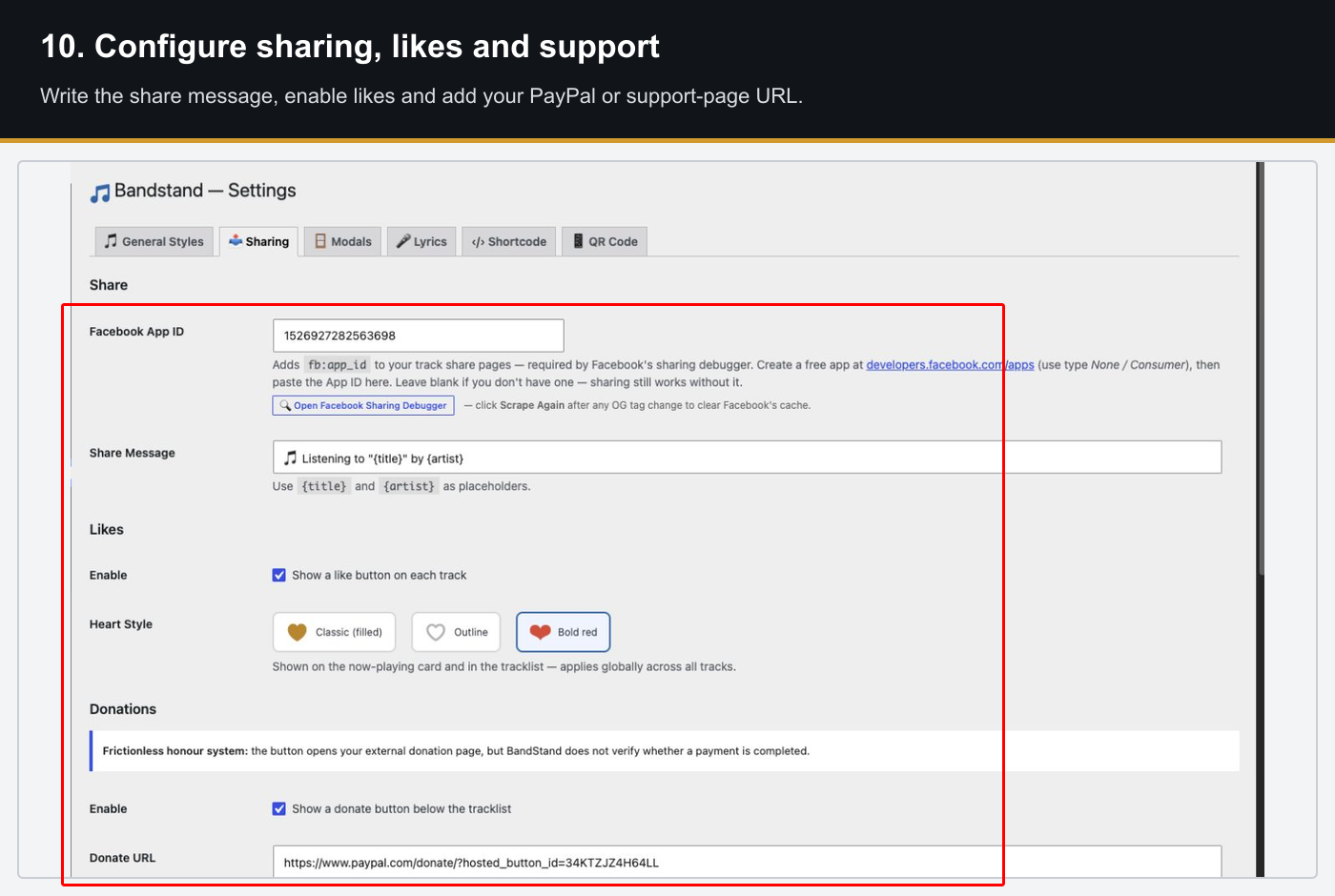
- Customisable share message with
{title}and{artist}placeholders - Each track has a deep-link URL:
?bs_track=<id>
- Like button on the now-playing card and per tracklist row
- Session-gated — one like per track per browser session
- Like count displayed on the card with notification
- Three heart styles: classic filled ♥, outline ♡, bold red ❤
- Admin popularity table with bar graph, per-track counts, bump controls and reset buttons
- Download button in the brand bar above the card
- Gated download modal — prompts the listener to support the artist before downloading
- Honesty / honour-system bypass link for returning supporters
- Per-track download file — can differ from the streaming MP3 if needed
- Configurable modal message, button labels and window width
- Attach a WebVTT (
.vtt) or SRT (.srt) file to any track via the media library - BandStand parses the cues and displays the active lyric line in real time on the now-playing card
- Enable or disable globally in the Lyrics settings tab
- Band logo upload (PNG with transparency recommended)
- Player title with show/hide toggle
- Accent colour picker – applied to EQ, progress bar, buttons and highlights
- Display font and body font selectors: theme fonts, BandStand bundled fonts, or system fonts
- Bundled fonts: Fraunces (serif display) and DM Mono (monospace body)
- Dark-mode design system with CSS custom properties throughout
Settings are organised across five tabs in BandStand → Settings.
General Styles
Band logo, player title, accent colour, EQ style (Wave/Bars/Mirror), EQ colour mode (Spectrum/Accent), EQ opacity, card gradient overlay, display font, body font, tracklist label.
Sharing
Share message template, like button toggle and heart style, donation section (URL, caption, button label), Track Popularity table.
Modals
Track Info pop-up (enable, window width, empty notes message), Download pop-up (enable, icon, message, button labels, honesty link text, window width).
Lyrics
Enable or disable the synced lyric display globally.
Shortcode
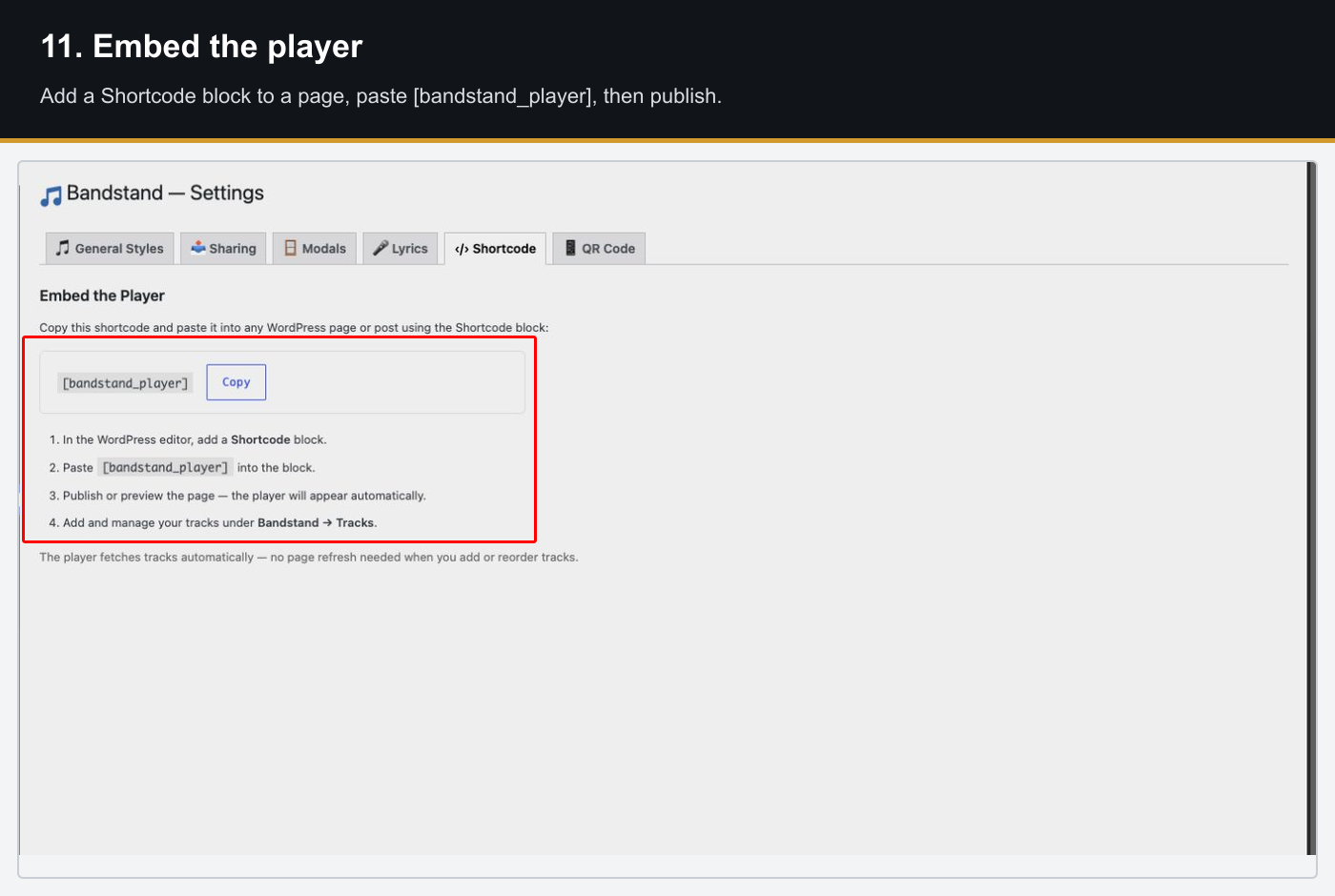
Copy-to-clipboard helper for the BandStand shortcode.
FlowScroll – Sequence Scroller
A Gutenberg block plugin that maps scroll position to an image sequence — with animated text, button and image overlays. Configured entirely through a built-in editor panel; no shortcodes or coding required.
Version
3.2.4
WordPres
6.0+
PHP
7.4+
Editor
Gutenberg only
Licence
GPL-2.0+
Installation & Quick Start
Overlay Types

Text
Heading (h1–h6) or paragraph. Full typography controls including font size, weight, letter spacing, word spacing, line height, max width, colour and opacity.

Button (CTA)
Link URL, label, style (Solid / Outline / Ghost), colours, padding and size. Optional modal mode — opens a freeform HTML overlay instead of navigating.
Image / Parallax
PNG, SVG or GIF layer. Optional parallax depth movement with configurable direction and speed. Fullscreen mode available per device.
Entrance Animation Types
All overlays support an optional exit animation. Exit easing uses a squared curve that holds opacity high before dropping away.
Timeline Editor

Keyframe diamonds
Drag Start, Intro end, Hold end and Out end to set timing. Values sync live to the form inputs.

Eye toggle
Show or hide any overlay in the preview and on the live site without deleting it.
Responsive
Adjust setting for desktop and mobile independently in the live preview
Take a look under the hood…
Have a good look at the FlowScroll admin area, change settings,
add overlays and experience the intuitive UI.
Full Feature Reference
- Canvas rendering — frames drawn to
<canvas>, preventing GPU-texture eviction flash - Preloader with progress bar — all frames fetched before the sequence becomes interactive
- Configurable scroll height — set how many viewport-heights the sticky section occupies
- Configurable frame count — maps scroll progress to frame index accurately
- Still-image mode — treat the sequence as a frozen image with overlays that animate on scroll
- Multiple sequences per page — each FlowScroll block is fully independent
- Visual position grid — drag a crosshair to place overlays anywhere in the frame
- Snap lines at horizontal and vertical centre and thirds
- Percentage-based positioning — resolution-independent across all screen widths
- Independent desktop and mobile positions for each overlay
- Full-viewport layer that sits above frames and below text overlays
- Gradient types: Linear (top-bottom, bottom-top, left-right, diagonals, custom angle), Radial, Solid
- Two independently configurable colour/opacity stops
- Configurable radial centre point and angle for linear gradients
- Type: None, Drop shadow, or Glow
- Strength slider (0–100%) — controls shadow opacity/intensity
- Size slider (0–100%) — scales spatial spread independently of strength
- Custom shadow colour picker
- Full animation runs on mobile by default, with its own font sizes and positions per overlay
- Disable on mobile — replaces the animated section with a static 16:9 poster (first frame) on screens ≤767 px
- Reduced-motion — respects
prefers-reduced-motion: reduce; section becomes a static image - Mobile preview: 390×844 phone frame at 460 px tall in the admin editor
- Drag to reorder overlay cards and timeline order
- Duplicate any overlay (all settings and timing included) with one click
- Delete an overlay permanently from the card header
- Auto-collapse — opening one card collapses all others
- Eye toggle — hide/show without deleting; persists across saves
- All settings saved via the WordPress REST API to a custom database table — no post meta pollution
- Auto-dirty detection — save button shows “Unsaved changes” when the config has been modified
- Each sequence has a unique ID referenced by the Gutenberg block
FlowNav
A WordPress plugin that renders a fully configurable fixed header bar, independent of the active theme. Includes scroll-aware colour transitions, logo swapping, mega menu with rich cards, a CTA button and WooCommerce icons.
Version
2.0.9
WordPres
5.4+
PHP
7.4+
Licence
GPL-2.0+
Installation & Quick Start
Scroll-Aware Colour States

- Background colour— any colour + opacity
- Text colour— independent of scrolled state
- Logo— upload a separate default logo
- Typically transparent or semi-transparent over a hero
scroll ↓
→

- Background colour— any colour + opacity
- Text colour— independent of default state
- Logo— upload a separate scrolled logo
- Transition speed configurable in milliseconds
The threshold can be set in px or vh, or tied to a CSS selector so the transition fires when a specific element scrolls out of view.
Mega Menu Setup
ssh-mega
Take a look under the hood…
Have a good look at the FlowNav admin area, change settings,
add tracks and experience the intuitive UI.
Full Feature Reference
- Fixed header bar — stays at the top of the viewport at all times
- Completely independent of the theme — works alongside any WordPress theme
- Automatically adds
padding-topto the page body so content is never hidden beneath the header - Smooth hide-on-scroll — slides up when scrolling down, reappears when scrolling back up
- Optional threshold mode — only hides after a set scroll distance
- Upload separate logos for Default and Scrolled states
- Logos crossfade smoothly on scroll transition
- Configurable logo scale (% of natural size) — resize without editing CSS
- Header shrink — header compresses to a smaller configurable height after the scroll threshold; logo scales proportionally
Triggered on hover over any top-level menu item tagged ssh-mega in Appearance → Menus.
- Each child menu item becomes a card with image, title, and description
- Featured image pulled automatically from the linked page
- Cards expand slightly on hover (
scale(1.03)) with a 350ms ease transition - Configurable card background and text colours
- Image layout: Left (side-by-side), Top (stacked), or None (text only)
- Image scale, body padding, title and description font sizes all configurable
- Card width and cards per row (1–6) configurable
- Fade in/out animation at 320ms; hover grace period prevents accidental close
- Panel centres under the triggering menu item and clamps to viewport edges
- Card Description supports HTML:
<b>,<i>,<ul>,<li>,<br>,<a>,<p>
- Configurable label text and URL
- Background colour, text colour, border radius, vertical padding, horizontal padding
- Hidden automatically on mobile (below 768 px)
- Subtle hover: slight opacity fade and upward nudge
- Optionally shown in the mobile overlay menu
- Hamburger icon appears at ≤768 px
- Tap opens a fullscreen overlay with the full navigation tree
- Independent background colour and text colour for the mobile overlay
- Supports nested sub-menus — tap to expand / collapse
- Desktop mega menu suppressed on mobile
- Cart icon — basket icon with live item count badge, links to the cart page
- Account icon — My Account link icon
- Both icons appear alongside the CTA button and are only visible when WooCommerce is active
Behaviour
Hide on scroll, hide at threshold, scroll threshold (px or vh), hero selector, override native header.
Appearance
Default and Scrolled colours, logos, logo scale, transition speed.
Layout
Header height, content width, content padding.
Navigation
Menu location, mega menu colours, card width, cards per row, image layout, font sizes, description opacity. Includes collapsible setup instructions.
CTA Button
Label, URL, background colour, text colour, border radius, padding.
Mobile
Fullscreen overlay background and text colours.
WooCommerce
Enable cart icon and account icon.
- Inline CSS variables output in
<head>— no flash of unstyled header on first paint - Static option cache —
get_option()called once per request - Asset version includes file modification time — busts CDN and browser cache on deploy
- Custom
admin_postsave handler — avoids WordPress Settings API recursive hook issue on some hosts - Tested with: Astra, GeneratePress, Hello Elementor, Twenty Twenty-Four
FlowText
A Gutenberg block plugin for animating heading and paragraph text. Supports scroll, load, hover, click and scroll-linked triggers. Split text mode animates word by word or character by character. Also works via CSS classes on any existing theme element — no block required.
Version
1.2.5
WordPres
6.0+
PHP
7.4+
Licence
GPL-2.0+
Installation & Quick Start
Trigger Types
📜
Scroll
Fires once when the element enters the viewport. Configurable threshold (0–90%). Optional replay on every scroll entry.
⚡
On Load
Fires immediately when the page loads, regardless of scroll position.
🖱
On Hover
Fires on mouse enter. Resets and replays each time the cursor enters the element.
🔗
Scroll Linked
Animation progress tracks scroll position in real time — the element animates forwards as you scroll down and backwards as you scroll up.
👆
On Click
Fires when the element is clicked.
All Animation Types
Fade
Slide
Zoom & Scale
Rotate & Flip
Bounce
Blur & Light
Special
Split Text Mode
💬
Split by Words
Each word enters sequentially — one at a time, no overlap. The chosen animation provides the motion for each word.
🔤
Split by Characters
Each character enters sequentially with its own motion. Works with all animation types.
Timing calculation
perPartMs = Duration ÷ part count
Clamped to 40–150ms per part
CSS Class Method
Animate any existing theme element without using the FlowText block — add classes directly to any HTML element.
Animation type (prefix: tap-)
slide-in-up slide-in-down slide-in-left slide-in-right
zoom-in zoom-in-bounce zoom-out scale-x rotate-in
rotate-down-left flip-x flip-y
bounce-in bounce-in-up bounce-in-down
blur glitch typewriter wave shake swing
rubber-band neon glow spotlight pop rise stamp
split-reveal pixelate char-flop
Split text
tap-split-words (split by words)
Trigger
(default: fires on scroll into view)
Timing
tap-delay-200 (initial delay in ms)
tap-threshold-20 (fire at 20% viewport height, 0–90)
Repeat & direction
tap-reverse tap-alternate tap-replay
Easing
tap-linear tap-spring tap-elastic
tap-ease-gentle tap-ease-strong tap-ease-heavy tap-ease-expo
| Setting | Default | Description |
|---|---|---|
| Animation | Fade In Up | Which animation to play |
| Tag | h2 | HTML element (h1–h6, p, span, div) |
| Trigger | Scroll | When to fire the animation |
| Duration | 600ms | Total animation time |
| Delay | 0ms | Wait before the animation begins |
| Easing | Expo Out | Motion curve |
| Repeat | Once | Play 1, 2, 3, or infinite times |
| Direction | Normal | Normal, reverse, or alternate |
| Split By | None | None, Words, or Characters |
| Threshold | 10% | Scroll trigger fire point (0–90%) |
| Replay | Off | Re-animate on every scroll entry |
| Colour | — | Override the text colour |
| Font Size | — | Override the font size |
| Text Align | Left | Left, centre, or right |
| CSS Class | — | Add extra classes to the element |
FlowText registers three automatic compatibility hooks when LiteSpeed Cache is active. No configuration needed.
- UCSS allowlist — whitelists heading selectors so LiteSpeed’s critical CSS scanner does not strip heading styles
- JS delay exclusion — prevents LiteSpeed from deferring the FlowText script, which would delay animations
- Inline critical CSS — protects heading font-size and font-weight from being stripped by UCSS optimisation
Version History
1.2.5
1.2.0
1.1.0
Coolshed Labs — WordPress Plugins · All plugins licensed GPL-2.0+